Example: IPv6 Networking
Michael Adams, 8-27-2007
http://www.wolfsheep.com/
Purpose
This document is to highlight an example setup for using tinc to create an IPv6 network.
Example Layout
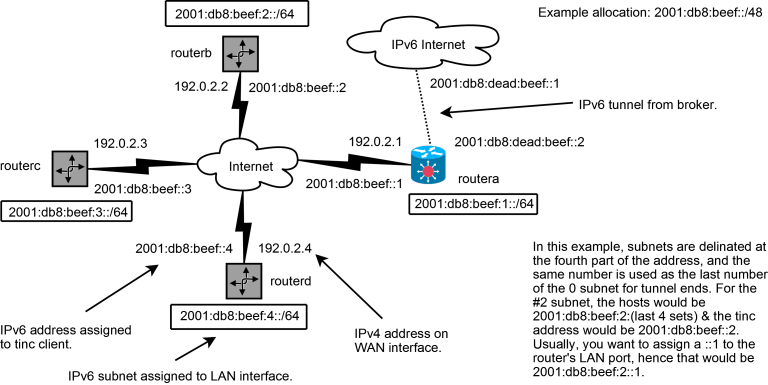 Click on the image for the original DIA)
file.
Click on the image for the original DIA)
file.
Scenario Parameters
- IPv6 is provided via a native or tunnel-brokered service at a main site. If you need a tunnel, refer to Wikipedia’s list of IPv6 tunnel brokers.
- The IPv6 allocation given is 2001:db8:beef::/48, using a tunnel from 2001:db8:dead:beef::1 to 2001:db8:dead:beef::2.
- All the tinc connections share a subnet of 2001:db8:beef:0::/64, and their addresses are tied to 2001:db8:beef:(subnet #)::/64 allocations. For example, “routerc” will listen on tinc at 2001:db8:beef::3, will have a LAN address of 2001:db8:beef:3::1, and a subnet of 2001:db8:beef:3::/64.
- All the routers and servers using tinc connect over the IPv4 Internet, using WAN addresses based on 192.0.2.0/24. “routerc” uses 192.0.2.3.
- ”routera” is a Linux server that manages the #1 subnet, and makes the connection to the IPv6 Internet.
- All other routers are assumed to be Linux based for their TUN/TAP support of bridged-Ethernet.
Configuration Files
- On Debian/Ubuntu systems, an entry in
/etc/network/interfacescan be used to statically assign the ::1 address for the local LAN. Example:
iface eth1 inet6 static
address 2001:db8:beef::1::1
netmask 64
mtu 1280
On non Debian/Ubuntu systems, a line can be put in a boot script, such as ip -6 addr add 2001:db8:beef:1::1/64 dev eth1.
-
IPv6 forwarding needs to be enabled: put
echo "1"
>/proc/sys/net/ipv6/conf/all/forwarding
in a boot script, ornet.ipv6.conf.all.forwarding = 1in/etc/sysctl.conf. -
This setup uses tinc’s “switch” mode: subnets are not assigned in the host files; only Address (for ConnectTo targets only) and the key are required in host files.
-
It is assumed that the config files go into something like
/etc/tinc/linkand/etc/tinc/nets.boothas an entry for “link”. The following table can be used to guide configuration of routers.
The “routera” configuration for tinc (the master router):
cat tinc.conf Name = routera Mode = switch Interface = vpn6
cat tinc-up
!/bin/sh
Enable tinc
ip -6 link set $INTERFACE up mtu 1280 txqueuelen 1000 ip -6 addr add 2001:db8:beef::1/64 dev $INTERFACE ip -6 route add 2001:db8:beef::/48 dev $INTERFACE
Static routing table
ip -6 route add 2001:db8:beef:2::/64 via 2001:db8:beef::2 ip -6 route add 2001:db8:beef:3::/64 via 2001:db8:beef::3 ip -6 route add 2001:db8:beef:4::/64 via 2001:db8:beef::4
cat tinc-down
!/bin/sh
Static routing table
ip -6 route del 2001:db8:beef:2::/64 via 2001:db8:beef:::2 ip -6 route del 2001:db8:beef:3::/64 via 2001:db8:beef:::3 ip -6 route del 2001:db8:beef:4::/64 via 2001:db8:beef:::4
Disable tinc
ip -6 route del 2001:db8:beef::/48 dev $INTERFACE ip -6 addr del 2001:db8:beef::1/64 dev $INTERFACE ip -6 link set $INTERFACE down The “routerb” configuration for tinc (the other non-master routers will be like this one):
cat tinc.conf
Name=routerb
Mode = switch
ConnectTo = routera
Interface = vpn6


cat tinc-up
!/bin/sh
ip -6 link set $INTERFACE up mtu 1280
ip -6 addr add 2001:db8:beef::2/64 dev $INTERFACE
ip -6 route add default via 2001:db8:beef::1


cat tinc-down
!/bin/sh
ip -6 route del default via 2001:db8:beef::1
ip -6 addr del 2001:db8:beef::2/64 dev $INTERFACE
ip -6 link set $INTERFACE down
- You can use radvd or
Quagga to perform stateless address
autoconfiguration on your LAN. This is an example zebra.conf
for LAN autoconfiguration (don’t forget to enable the zebra
daemon):
ipv6 forwarding
!
interface eth1
no ipv6 nd suppress-ra
ipv6 address 2001:db8:beef:1::1/64
ipv6 nd prefix 2001:db8:beef:1::/64
ipv6 nd ra-interval 10
!
interface vpn6
!
interface lo